Reading the screen: OCR and self-hosted LLMs to enrich broadcast transcripts
Two earlier posts covered transcribing broadcast audio with Whisper and deduplicating speaker voices in PostgreSQL. This one is about the two layers on top: reading what is written on the screen, and using LLMs to turn a raw transcript into something a human can search: titles, keywords, people, places, organizations, topic classification.
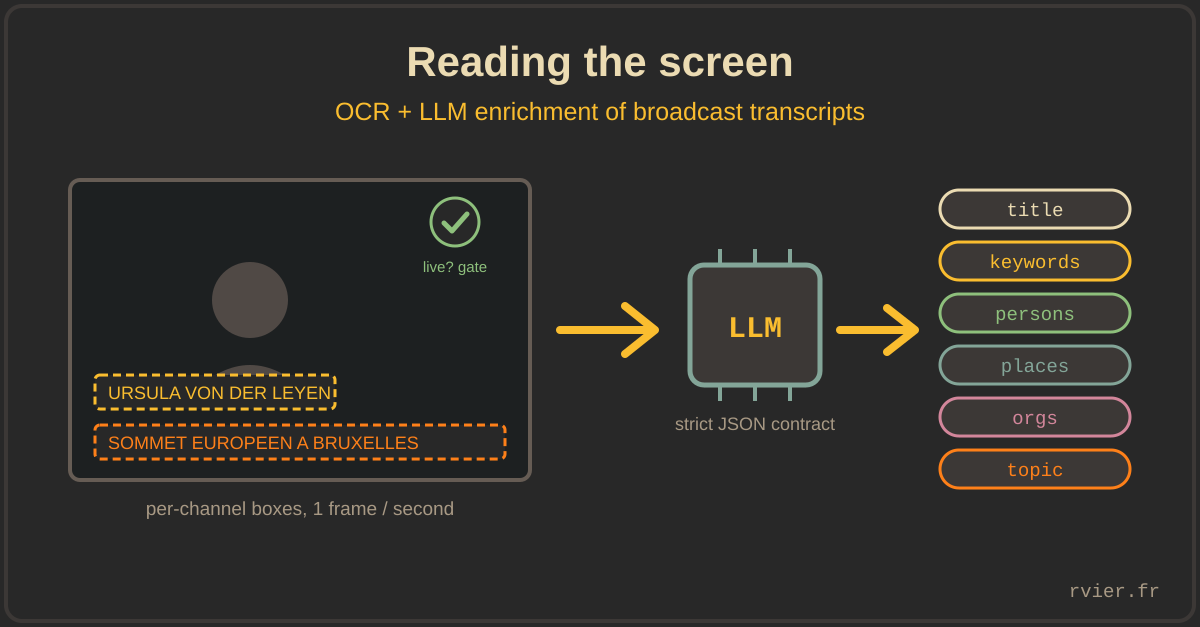
The screen of a news channel is full of metadata that speech never carries: the name of the person talking sits in a banner, the current subject in a strap. And the transcript itself, even perfect, is a wall of diarized text. Both problems have the same production constraints as the STT pipeline: 24/7, unattended, and honest about its own confidence.
Per-channel boxes, drawn once, stored in PostgreSQL
A generic "OCR the whole frame" produces noise: tickers, ads, program logos. What we actually want lives in stable regions that each channel keeps for years. So each channel has boxes in a PostgreSQL table: a speaker-banner zone and a subject-strap zone, stored as normalized coordinates (resolution-independent), drawn once in a small internal UI and reloaded by the workers every hour.
The OCR pass itself (EasyOCR, French and English) still reads the full frame, one frame per second: detections are then filtered by box, grouped into lines by their Y coordinate, and concatenated. Running detection once and filtering by zone is cheaper than running the recognizer three times on three crops, and it keeps the option of adding a new box without touching the worker.
A cheap gate before any OCR
The most cost-effective part of the whole worker is a gate that runs before any text extraction. French news channels present live programs differently from commercials, trailers and reruns, and there is a fast, almost free way to tell the two apart from the frame itself (I will keep the exact signal for us). If the frame does not look like live programming, it is skipped entirely: no OCR, no results, no noise. That one check avoids transcribing ad banners all day, and it costs a fraction of the actual OCR pass.
Confidence is a contract, so post-process it honestly
Downstream consumers filter OCR results by confidence, which means the confidence must mean something. Two adjustments earned their place:
- Length-weighted aggregation. A box usually contains several detections. The reported confidence is the average of per-detection scores weighted by text length, so a long, well-read subject line is not dragged down (or propped up) by a two-letter fragment.
- A spellchecker pass, only below 0.8. Banners are tightly kerned and all-caps, and EasyOCR's classic failure is gluing words together. For low-confidence detections only, each unknown word is tested against a French dictionary, including every two-word split:
bonjourmondecomes back asbonjour monde. Confident detections are left strictly alone; post-processing text the OCR was sure about is how you corrupt good data.
For the residual errors, there is a separate correction service, and it is deliberately not a frontier model: OCRonos, a small model trained specifically for OCR correction, quantized to 8-bit, self-hosted behind a 70-line Flask endpoint with Prometheus metrics. A narrow task does not need a large model: it needs a specialized one that fits on a GPU you already own and answers in tens of milliseconds.
A recognizer fine-tuned on our own pixels
The biggest accuracy gain did not come from post-processing at all: it came from fine-tuning the OCR model itself. EasyOCR's stock latin recognizer is trained on generic scene text; TV overlays are the opposite of generic. Each channel uses the same handful of fonts, colors and backgrounds for years, all-caps, tightly kerned, always at the same size. That is a narrow visual domain, and narrow domains are exactly what fine-tuning is for.
So we built our own training set from production: one script samples video chunks and extracts crops of the text zones, another turns them into an annotated dataset (the stock model's own output, manually corrected, makes a decent first pass at labelling). On top of that we fine-tuned EasyOCR's recognition network, the classic VGG + BiLSTM + CTC recipe, grayscale input, with a French character set (accents, ligatures, the euro sign), starting from the stock latin_g2 weights rather than from scratch.
Deploying a custom recognizer with EasyOCR is pleasantly boring, one parameter:
reader = easyocr.Reader(['fr', 'en'], recog_network='yacast_filtered')
The detector stays stock; only the recognition head is ours. The result is a 15 MB model, trained on one GPU, that reads our channels' overlays better than any general-purpose model we tried, and it never leaves our infrastructure. Same lesson as OCRonos, one step further: when the domain is closed, the cheapest path to quality is not a bigger model, it is your own data.
LLM enrichment: a worker like any other
The enrichment stage takes a window of diarized transcript segments and asks a model to return, per segment: a title, five keywords, the persons, places and organizations mentioned, and one topic code from a closed list of fifteen (politics, economy, sport...). Architecturally it is the same pull-queue worker as everything else in the platform: fetch task, fetch STT window, call the model, validate, push results, set a per-stage status code. The LLM is just another flaky dependency.
The lessons are all in the prompt and the handling around it:
- The prompt is an output contract, not a conversation. Ours specifies the exact JSON array shape, one object per input segment, single-letter field names (
t,k,sd,ed,p,l,o,c) to keep output tokens down, and explicit prohibitions: never invent or modify a date, never return the transcript content, never merge segments. - Give the model a boring escape hatch. Non-editorial segments (jingles, weather loops, transitions) must come back as
t: "Inconnu", class 15. Without a designated dumping ground, the model classifies noise creatively. - Ask for the correction you would do anyway. The prompt tells the model to normalize proper names that are "manifestly phonetic": a transcript hears "Ursula fonderlayen", the enrichment returns the person as Ursula von der Leyen. The LLM fixes the STT for free, at the only stage that has enough context to do it.
- Validate like it will fail, because it will. The response is parsed strictly; a malformed JSON marks the task in error, and the core's retry service re-queues it. No partial parsing, no regex rescue of almost-JSON.
Self-hosted or hosted: make it a flag, not an architecture
The worker talks to its model through the OpenAI-compatible chat completions API, with the model name and endpoint as command-line flags. That single decision keeps the backend a deployment choice instead of a rewrite: the same worker has run against Ollama on our own GPUs and against hosted APIs, and it will run against whatever wins the next evaluation.
And evaluation is the point. Before wiring this in, we benchmarked the classification and entity tasks over a labeled month of a French news channel, comparing self-hosted Llama 3.1/3.2, Gemma 2 and PleIAs models (via Ollama, temperature 0, JSON mode) against hosted ones, on the CSVs, side by side. The honest summary: closed-list classification is well within reach of small self-hosted models; consolidating segments into coherent editorial blocks and reliably correcting proper names is where the larger models still earn their cost. Where each task runs is a price/quality decision we revisit, which is exactly why it must stay a flag.
Takeaways
- On-screen text is structured metadata, not an image problem: per-channel boxes in a database beat any generic full-frame OCR.
- Find your cheap gate. A near-free check on the frame decides whether it is worth processing at all, before any expensive model runs.
- Confidence must survive post-processing: correct only what the OCR was unsure about, and weight aggregate scores by text length.
- Small specialized models (OCRonos for OCR correction) are the quiet win of self-hosting: one GPU, one narrow task, no API bill.
- When the visual domain is closed, fine-tune the recognizer on your own frames: a 15 MB model trained on your data beats a general-purpose one on your channels.
- Treat the LLM as a pipeline stage with a strict output contract: closed vocabularies, mandatory fallbacks, hard validation, retries. Never as a conversation.
- Keep the model behind an OpenAI-compatible flag, and re-run your evaluation: the answer to "self-hosted or hosted?" changes per task, and it changes over time.