Turning the Omarchy clock into a Planova panel, one prompt at a time
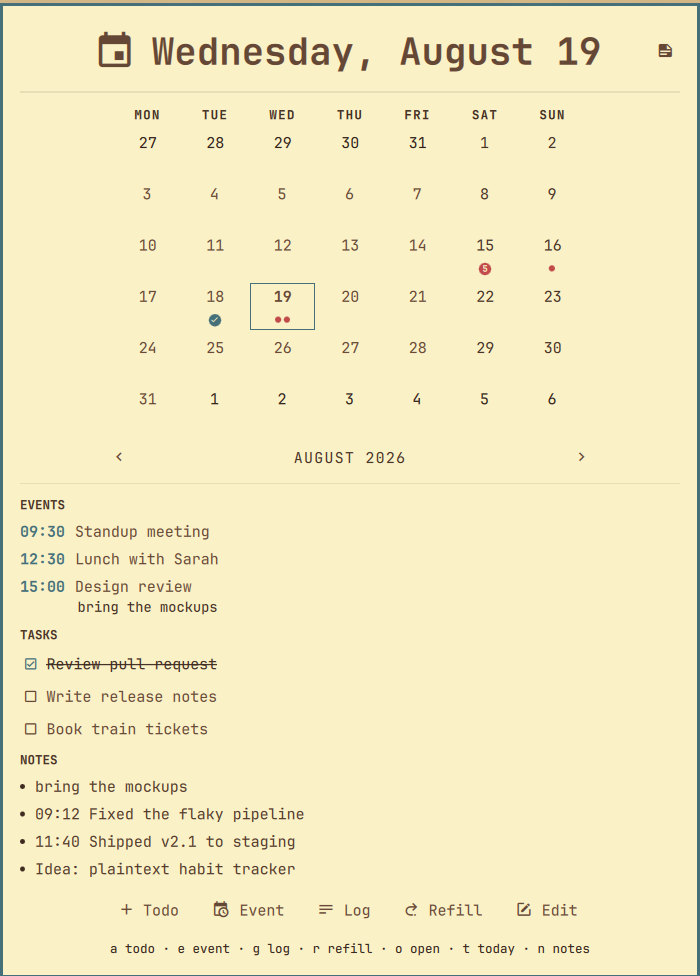
Omarchy 4 rebuilt its bar and desktop shell on quickshell. In the middle of the bar sits a widget showing the date and time, and clicking it opens a small calendar. Nice, but I don't need a generic calendar: my agenda, todos and notes already live in Planova's Markdown files, one file per day, synced everywhere with Syncthing. So I thought: why not transform this widget so it looks like Planova?
One prompt, a Sunday morning
Omarchy 4 has a plugin system for its shell: a plugin is a folder with a manifest.json and some QML files, and shell.json decides which widget goes in which bar slot. So on a Sunday morning I opened Claude Code in an empty directory and typed this, typos included:
The purpose of this projects is to create a quickshell extension for omarchy 4 quickshell which replace the date time panel, with a panel which have all the planova features look at ~/Projects/Planova. The result should be fully compatible with planova formats
That's the whole spec. The part that did the heavy lifting is look at ~/Projects/Planova: instead of describing my file format, I pointed the agent at the Flutter app that defines it. It read Planova's Dart parser and ported the regexes and insertion rules line for line into a small JavaScript module, then ported the Dart unit tests to node --test so the compatibility could be checked without even starting Qt. That last part matters: "compatible with Planova formats" is exactly the kind of promise that quietly breaks on an edge case, and 385 lines of ported tests are a much better guarantee than my code review.
By mid-afternoon the clock was replaced by a widget with the same date/time label (my shell.json format settings even carried over), a badge counting today's undone todos, and a panel with a month calendar, the selected day's events and tasks, quick add, and a notes browser. About 2,700 lines of QML and JavaScript I never wrote.
A few follow-ups
The rest was small requests typed as I used the thing, in French because that's what comes out when I stop thinking of it as a spec. Translated:
- "It could be a good idea if every add or edit action had a keyboard shortcut."
- "How do I open the panel with a shortcut?" The agent edited my Hyprland bindings itself:
SUPER + Dnow runsomarchy-shell shell toggle fr.rvier.planova. - "Isn't there room for a simpler shortcut?" and then "let's drop the Shift for events and logs too". Its first proposals were Shift-heavy; after two pushbacks,
eadds an event andga log entry. - "The widget should follow the dark/light theme."
- "Well then, create the repo on my GitHub." The result is at github.com/brvier/PlanovaQuickShell, changelog written and v0.1.0 tagged by my release skill.
None of these mention QML types or quickshell APIs. They read like messages to a colleague who has the code open, and that's why the whole thing works: everything in Omarchy is a text file. Hyprland bindings, shell.json, plugin manifests, QML, themes: there is no settings database, no GUI-only option, nothing an agent can't read and edit. And when the format knowledge isn't in a config file, it's in a repo I can point at. The prompt stays one sentence because the context does the specifying.
It wasn't friction-free. omarchy plugin add refuses symlinks, and the shell doesn't reliably reload QML from a symlinked plugin, so during development every edit needs an omarchy-restart-shell. The agent hit that wall, figured it out, and wrote the workaround into the README.
Conclusion
Omarchy with quickshell can be bent to fit its user surprisingly fast. This panel is the biggest example, but the same approach gave me a gruvbox light theme in a fraction of the time. Custom desktop tools used to be weekend projects you never start; on a distribution where everything is a text file, with an agent that reads code better than it reads specs, they cost a morning and a handful of follow-ups.
Full disclosure, since we're on the subject: this post itself was developed by AI, from a ten-line outline in French, with the agent rereading my Claude Code session history and my bash history to get the facts straight. The prompts you read above are the real ones.