Fine-tuning EasyOCR on your own frames: a practical guide
In the OCR + LLM post I mentioned that our biggest OCR accuracy gain came from fine-tuning the recognition model on our own frames. Several people asked for the how, and the honest answer is that EasyOCR fine-tuning is poorly documented: the pieces exist (an official trainer, a custom-network mechanism), but nobody shows the full path from "production frames" to easyocr.Reader(recog_network=...). This is that path, exactly as we walked it.
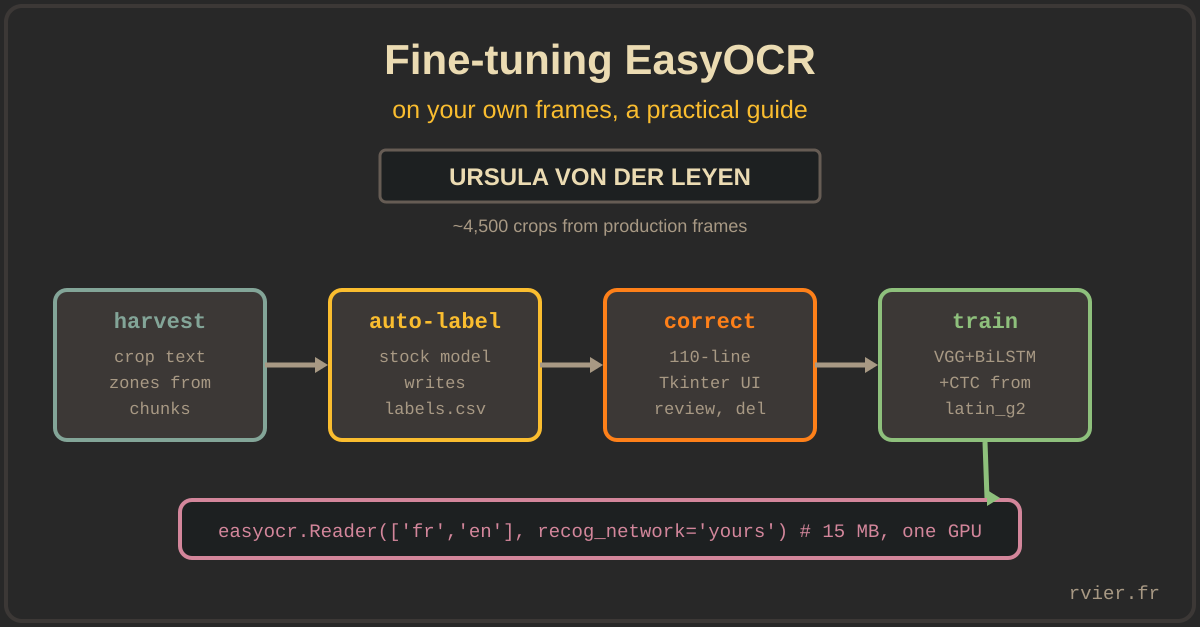
Context: we read text overlays on TV frames (speaker banners, subject straps). A closed visual domain, the same fonts and colors for years, all-caps, tight kerning. The stock latin recognizer is trained on generic scene text and struggles precisely where our data is idiosyncratic. Fine-tuning fixes that, and the whole thing fits on one GPU and a few evenings.
Step 1: harvest crops from production
The dataset is built by a script that reuses the production plumbing: fetch video chunks, decode frames with OpenCV, and cut out the configured text zones (the same per-channel boxes the production worker uses). Each crop is saved as a PNG named after its channel and timestamp.
The trick that makes the dataset cheap: the stock model labels its own training data. Each crop is run through vanilla EasyOCR, and the predicted text is appended to a labels.csv alongside the image path:
result = reader.readtext(crop, paragraph=True)
if result:
    cv2.imwrite(crop_path, crop)
    labels.write(f"{crop_path},{result[0][1]}\n")
The stock model is right most of the time; its mistakes are exactly what we want to teach away. Sampling across channels and across days (news mornings, evening shows, weekends) gave us about 4,500 labelled crops. Diversity matters more than volume here: 4,500 crops covering every banner style beat 50,000 crops of the same show.
Step 2: correct labels with the dumbest possible UI
Auto-labels must be verified by a human, and this is where most fine-tuning projects die of friction. Ours survived because the correction tool is a 110-line Tkinter app: it shows the crop (scaled 2x), the predicted text in an editable field, and three buttons: next (save), delete (bad crop: empty zone, transition frame, half-drawn banner), jump to index. Enter, Enter, fix one word, Enter, delete, Enter.
Correcting a pre-filled label is far faster than typing one, because most labels are already right: you are reviewing, not transcribing. One person clears a few thousand crops in a couple of sessions. Resist the urge to build a web app with accounts and progress bars; the CSV plus Tkinter was built in an hour and did the job.
Two curation rules that paid off:
- Delete, don't fix, ambiguous crops. A crop where a human hesitates teaches the model to hesitate.
- Keep the empty-prediction crops out entirely. The recognizer's job is reading text, not deciding whether text exists; that filtering happens elsewhere in the pipeline.
Step 3: train with EasyOCR's own trainer
EasyOCR's recognizer comes from the deep-text-recognition-benchmark lineage, and the project ships a trainer for it. The architecture is chosen by configuration; ours is the same as the stock latin model, because we are fine-tuning, not redesigning:
Transformation: None
FeatureExtraction: VGG
SequenceModeling: BiLSTM
Prediction: CTC
input_channel: 1        # grayscale
output_channel: 256
hidden_size: 256
imgH: 64
imgW: 600               # banners are wide; don't squash them
batch_max_length: 34    # longest label in the dataset, plus margin
batch_size: 32
num_iter: 300000
saved_model: saved_models/latin/latin_g2.pth   # start from stock weights
new_prediction: True
character: "0123456789!\"#$%&'()*+,-./:;<=>?@[\\]^_`{|}~ €ABC...àâäæçéèêëîïôœùûüÿ"
The decisions worth explaining:
- Start from
latin_g2, never from scratch. The stock weights already know what glyphs look like; you are teaching fonts and layout, not the alphabet. From-scratch training on 4,500 images would simply overfit. new_prediction: Truereplaces the final classification layer, which you need whenever your character set differs from the base model's. Ours is trimmed to what actually appears on French TV overlays: digits, punctuation, the euro sign, and French accented characters (114 classes total). A smaller output layer is a small win in itself; not asking the model to distinguish glyphs it will never see is the bigger one.imgW: 600andimgH: 64match the shape of the real crops. The default trainer settings assume smaller scene-text snippets; wide banners squashed into a narrow input lose exactly the kerning detail we are trying to learn.- Case-sensitive (
sensitive: True) even though overlays are mostly upper-case, because the mixed-case minority (names, titles) is where errors hurt most.
Practical warnings: the trainer is research-grade code. Expect to pin dependency versions and patch small incompatibilities when your PyTorch is newer than the trainer (we did). Keep the validation set as crops from days and channels not present in training, otherwise your accuracy number measures memorization. On a single GPU, this configuration trains overnight.
Step 4: deploy with three files
EasyOCR's custom-recognizer mechanism wants three files:
~/.EasyOCR/model/yacast_filtered.pth          # the fine-tuned weights
~/.EasyOCR/user_network/yacast_filtered.py    # network definition (from the trainer)
~/.EasyOCR/user_network/yacast_filtered.yaml  # charset + network params + imgH
The YAML must repeat the training-time character list and network parameters exactly; a mismatch fails at load time when you are lucky, and silently garbles output when you are not. Then the swap is one parameter:
reader = easyocr.Reader(['fr', 'en'], recog_network='yacast_filtered')
Everything else stays identical: the detector is still the stock CRAFT model (detection generalizes fine; it is recognition that is domain-sensitive), the API is unchanged, and the production worker did not need a single other modification. The result is a 15 MB model that reads our channels' overlays better than any general-purpose model we tried, stock EasyOCR included.
Takeaways
- Fine-tune the recognizer, keep the stock detector: detection generalizes, recognition is where your domain lives.
- Let the stock model label its own training data, then pay a human only for corrections. Reviewing is an order of magnitude faster than transcribing.
- The correction tool should be embarrassingly simple. Friction, not model quality, is what kills small fine-tuning projects.
- Start from the pretrained weights, trim the character set to your domain, and match the input geometry (
imgH,imgW) to your real crops. - Validate on days and channels the training never saw, or your metric measures memory.
- A 15 MB specialized model, one GPU, a few thousand curated crops: that is the entire budget for beating general-purpose OCR on a closed domain.